|
|
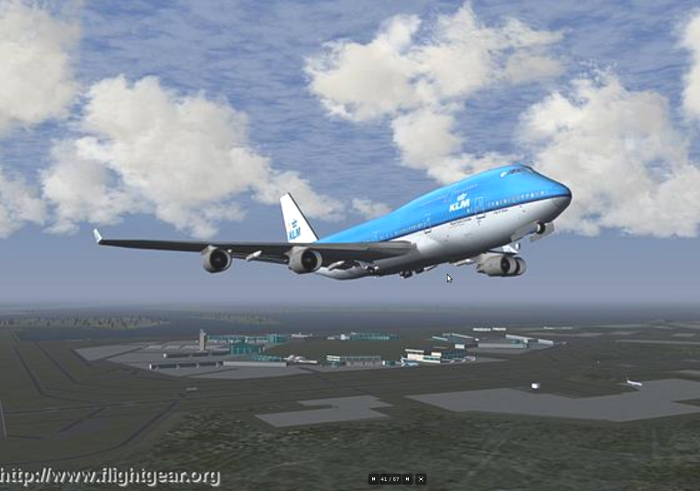
A Boeing 747-400 taking off from KSFO, San Francisco, California, USA
|
Developed by:
Michael Basler, Martin Spott,
Stuart Buchanan, Jon Berndt,
Bernhard Buckel, Cameron Moore,
Curt Olson, Dave Perry,
Michael Selig, Darrell Walisser,
and others
Revised by Jörg Emmerich
September 2011, for
FlightGearVersion 2.4.0
FlightGear is a free Flight Simulator developed cooperatively over the
Internet by a group of flight simulation and programming enthusiasts.
"The FlightGear Manual" is meant to give beginners a guide in getting
FlightGear up and running, and themselves into the air. It is not
intended to provide complete documentation of all the features and
add-ons of FlightGear but, instead, aims to give a new user the best
start to exploring what FlightGear has to offer.
There is little, if any, material in this Guide that is presented here
exclusively. You could even say with Montaigne that we “merely gathered
here a big bunch of other men’s flowers, having furnished nothing of my
own but the strip to hold them together”. Most (but fortunately not
all) of the information herein can also be obtained from the FlightGear
web site located at http://www.flightgear.org/
This version of the document was written for FlightGear version 2.4.0.
Users of earlier versions of FlightGear will still find this document
useful, but some of the features described may not be present.
We kindly ask you to help us refine this document by submitting
corrections, improvements, and suggestions. All users are invited to
contribute descriptions of alternative setups (graphics cards,
operating systems etc.). We will be more than happy to include those in
future versions of The FlightGear Manual (of course not without giving
credit to the authors).
About This Manual
FlightGear may be used like any other plaything to move with some
kind of modeled-aircraft from one location to another and just
having fun -- while actually it is a very detailed Flight-Gear-Flight-Simulator
(FGFS) in which you can simulate the whole complex environment of
- flying aircrafts of all types behaving like real aircrafts
- in 3D-sceneries of the whole world
- under actual weather and daytime restrictions
- within the surrounding activities of a big, worldwide avionic
operation
- controlled by Air-Traffic-Controllers and Ground Operations
- which strives to become a FAA-approved flight training device
for certified pilots.
Covering this very large area requires a whole lot of learning - which
often is not really wanted and/or required for the first steps into
this Simulation Environment. So we try to offer a guide which covers
everything - but is structured also as a reference, that allows you to
start with a minimum of reading and offers step by step enhancements.
So
The "Parts" of the Manual
You navigate through the Manual by mouse-clicking into one of the tabs
in the top-menu-bar. Those are introducing more and more "KnowHow",
going
from left to right. On top of each "Part" you find a "Table of
Contents" that brings you to the chapter of your interest - of course
it is suggested to first browse through it from top to bottom, just to
see what is covered. Within all chapters you will find lots of "Links"
that references other parts of the Handbook and/or to external
references. You can always return from those by clicking your browsers
"page back/forth" icons.
- The first Tab "Exit"
always brings you back to the page from where you called the Manual
- Further down this part "Start"
you find some more general hints and a short explanation of "why and
what" is FlightGear.
- You need to understand the Part "Installation"
if you want to extend your installation, and thus need to know where is
what, and what are the dependencies. For a first trail you can just
install the very minimums from the FlightGear HomePage http://www.flightgear.org/Downloads/binary.shtml.
- If you are new to piloting, you should see the part "Briefing". That one explains how to
- how to start FlightGear with different Options in different
environments
- explains what the basic instruments in the cockpit are for
- how you control your model by keyboard and/or mouse and/or
joystick etc.
- and all the options that are offered by the FlightGear menu-bar.
- If you never have piloted before you definitely should start
flying with the "Solo Flight"
to learn how to use the controls
- The part "KnowHow"
introduces some fundamentals about flying and how to improve
your skills
- "VFR
X-Country"
is for the "getting serious" pilots! You learn how to perform a real
"Cross Country" flight, just navigating by visual landmarks basic
instrumentation - and a good flight planning!
- "RNAV"
introduces you to the world of Radio-Navigation (Communication, VOR,
ILS, NDB, Autopilot, etc.), it also shows you lots of detailed examples
- Based on the parts "VFR X-Country" and "Radio-NAV" we will plan
and perform an "IFR X-Country",
i.e. now with will fly the X-Country without seeing anything outside
the plane!
- Finally "Features"
gives you some hints to additional, charge free programs which will
enlarge the usability and opportunities of FlightGear, especially in
the area of "Multiplayer"
- At the end the "Appendix"
will explain the used "technical terminology", list ALL the "command
Options" and some infos about the past and future of FlightGear
For the most Impatient
We know, that there are many who do not like to read big books full of
theories, prior to being able to "Start
Flying". Thus we try to offer you a "short-cut" by first start
and then be able to learn more and more and/or revisit what
you did! Thus you may try:
- Todays standard PC's, Notebooks, etc. all have more
resources than are required for FlightGear. If you are in doubt check
the
"System Requirements" in the
"Installation" (see above tab).
- If the Program is running far to slow, check especially the
requirements on the Graphic-Card.
- For the very beginning you may
- Then, in order to learn the basics about how to control the model
by mouse, keyboard,
joystick etc.
- see/print the short leaflet in your FlightGear directory: $FG_ROOT/Docs/FGShortRef.pdf
- and/or see the complete description about that in the part "Briefing"
- if you are new to flying-procedures you should exercise the
part "Solo Flight"
for
your first "real flying" attempts
- If you run into problems or want to install more then just the
Basic-Program (e.g. more models, scenery, features, etc.), you should
look through
the whole Part "Installation"
for the basic prerequisites, structures, and conventions.
- And then just visit the Parts as lined out in the menu-bar above,
whenever you are ready to learn more!
Further Reading
While this introductory guide is meant to be self contained, we suggest
you have a look into further documentation, especially
in case of trouble:
- Used Abbreviations and all available options are listed in the "Appendix"
- In your $FG_ROOT-directory there
are many additional user documentations on particular features and
function written by the designers themselves. Just look into the files
"README.xyz" ("xyz" being the
theme being explained)
External Literature
There is an immense amount of Literature available about flying - even
free in the WEB. Here we will just list a few we found helpful to
extend the knowledge provided by our FlightGear Guide:
And some more
interesting links:
And again: There are many, many more. Ask you friends: Probably
everybody has some favorites from which you can choose.
About FlightGear
- Did you ever want to fly an airplane yourself, but lacked the
money
or ability to do so?
- Are you a real pilot looking to improve your skills without
having to take off?
- Do you want to try some dangerous maneuvers without risking your
life?
- Or do you just want to have fun with a more serious game without
any violence?
If any of these questions apply to you, PC flight simulators are just
for you. You may already have some experience in using Microsoft’s
Flight Simulator or any other of the commercially available PC flight
simulators. As the price tag of those is usually within the $50 range,
buying one of them should not be a serious problem -- given that
running
any serious PC flight simulator requires PC hardware within the $1.500
range, despite dropping prices.
Yet Another
Flight Simulator ???
With so many commercially available flight simulators, why would we
spend thousands of hours of programming and design work to build a free
flight simulator? Well, there are many reasons, but here are the major
ones:
- All of the commercial simulators have a serious drawback:
they are made by a small group of developers defining their properties
according to what is important to them and providing limited interfaces
to end users. Anyone who has ever tried to contact a commercial
developer would agree that getting your voice heard in that environment
is a major challenge. In contrast, FlightGear is designed by the people
and for the people with everything out in the open.
- Commercial simulators are usually a compromise of features
and usability. Most commercial developers want to be able to serve a
broad segment of the population, including serious pilots, beginners,
and even casual gamers. In reality the result is always a compromise
due to deadlines and funding. As FlightGear is free and open, there is
no need for such a compromise. We have no publisher breathing down our
necks, and we’re all volunteers that make our own deadlines. We are
also at liberty to support markets that no commercial developer would
consider viable, like the scientific research community.
- Due to their closed-source nature, commercial simulators
keep developers with excellent ideas and skills from contributing to
the products. With FlightGear, developers of all skill levels and ideas
have the potential to make a huge impact on the project. Contributing
to a project as large and complex as FlightGear is very rewarding and
provides the developers with a great deal of pride in knowing that we
are shaping the future of a great simulator.
- Beyond everything else, it’s just plain fun! I suppose you
could compare us to real pilots that build kit-planes or
scratch-builds. Sure, we can go out and buy a pre-built aircraft, but
there’s just something special about building one yourself. The points
mentioned above form the basis of why we created FlightGear. With those
motivations in mind, we have set out to create a high-quality flight
simulator that aims to be a civilian, multi-platform, open,
user-supported, and user-extensible platform.
Let us take a closer look at each of these characteristics:
- Civilian: The
project is primarily aimed at civilian flight simulation. It should be
appropriate for simulating general aviation as well as civilian
aircraft. Our long-term goal is to have FlightGear FAA-approved as a
flight training device. To the disappointment of some users, it is
currently not a combat simulator; however, these features are not
explicitly excluded. We just have not had a developer that was
seriously interested in systems necessary for combat simulation.
- Multi-platform:
The
developers are attempting to keep the code as platform-independent as
possible. This is based on their observation that people interested in
flight simulations run quite a variety of computer hardware and
operating systems (see the actual list under "Operating
Systems"
within "Installation"). At present, there is no other known flight
simulator – commercial or free – supporting such a broad range of
platforms.
- Open: The
project is not restricted to a static or elite cadre of developers.
Anyone who feels they are able to contribute is most welcome. The code
(including documentation) is copyrighted under the terms of the GNU
General Public License (GPL).
- The GPL is often misunderstood. In simple terms it states that
you can
copy and freely distribute the program(s) so licensed. You can modify
them if you like and even charge as much money for it as you want, for
the
distribution of the modified or original program. However, when
distributing the software you must make it available to the recipients
in source code as well and it must retain the original copyrights. In
short:
| ”You can do anything with the
software - except make it non-free” |
- User-supported
and user-extensible: Unlike
most commercial simulators, FlightGear’s scenery and aircraft formats,
internal variables, APIs, and
everything else are user accessible and
documented from the beginning. Even without any explicit development
documentation (which naturally has to be written at some point), one
can always go to the source code to see how something works. It is the
goal of the developers to build a basic engine to which scenery
designers, panel engineers, maybe adventure or ATC routine writers,
sound artists, and others can build upon. It is our hope that the
project, including the developers and end users, will benefit from the
creativity and ideas of the hundreds of talented “simmers” around the
world.
Without doubt, the success of the Linux project, initiated by Linus
Torvalds, inspired several of the developers. Not only has Linux shown
that distributed development of highly sophisticated software projects
over the Internet is possible, it has also proven that such an effort
can surpass the level of quality of competing commercial products.